CNC Quoting in Excel: A Spreadsheet and Its Limits
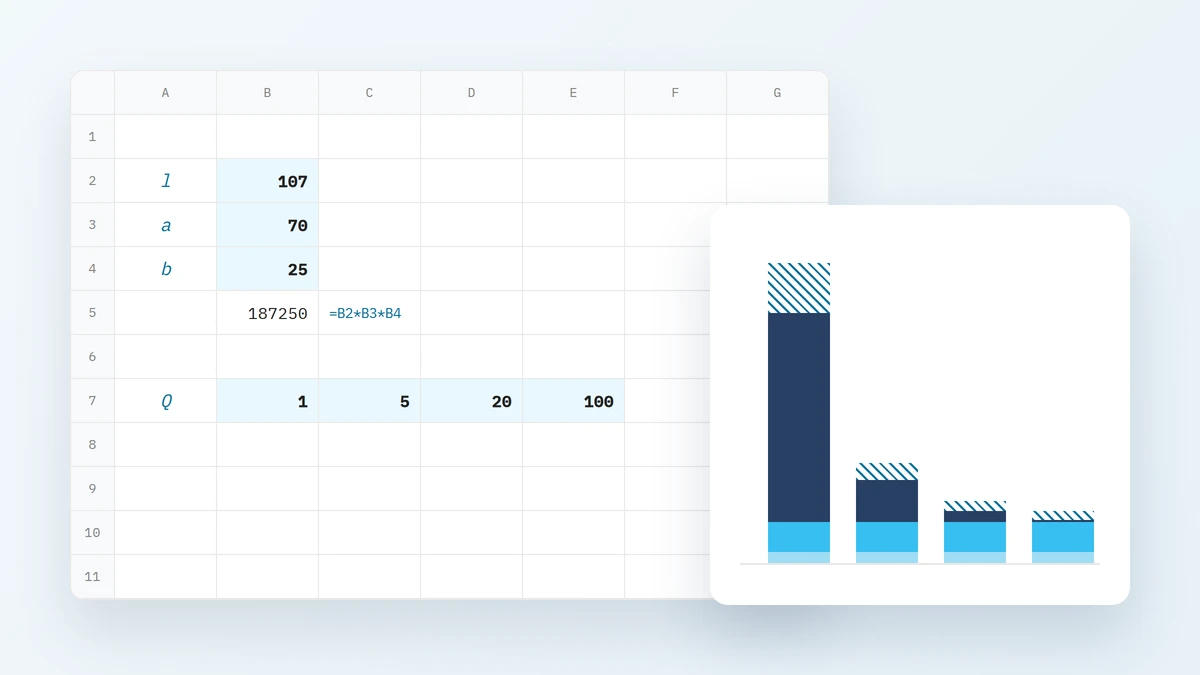
A spreadsheet can produce a good price for a CNC part, and it has one real advantage: every formula is visible, so anyone in the shop can check it. Below we build such a spreadsheet from scratch, with formulas and a worked example for one part, and then show five places where the spreadsheet starts costing more than it saves.
What makes up the price of a CNC part
The price of one piece is the sum of four components: material calculated from the blank, machining time multiplied by the machine rate, preparation cost (setup and programming) spread over the batch, and markup. Each component has its own data source and its own typical mistake, so in a spreadsheet it pays to keep them in separate rows.
The whole calculation fits in one formula:
where:
- - net unit price [EUR/pc],
- - material cost per piece [EUR],
- - machining cost per piece [EUR],
- - preparation cost for the whole order [EUR],
- - batch size [pcs],
- - markup on cost, e.g. for 20%.
Material is calculated from the mass of the blank, not of the finished part, because you pay the stockholder for the chips as well. For flat or rectangular bar:
where:
- - mass of the blank [kg],
- - material price [EUR/kg],
- - stock cross-section dimensions [mm],
- - cut length including saw allowance [mm],
- - material density [g/cm³].
Machining cost is the unit time multiplied by the machine rate. Preparation cost combines the machine setup time with the programmer's time, which usually carries a different rate:
where:
- - unit machining time per piece [min],
- - setup time of the machine [min],
- - programming and process planning time [min],
- - machine-hour rate [EUR/h],
- - hourly rate of the process engineer or programmer [EUR/h].
Setup is paid once per order, regardless of quantity. That is why the unit price depends so strongly on the batch, which we cover in more detail in the article on the cost of machine setup.
The spreadsheet step by step
The spreadsheet is best built vertically: one part, one column of values, every input in its own cell and every formula referring only to cells, never to numbers typed into the formula. All numbers below are examples and serve only to show the mechanics. They are not the price list of any shop.
Example part: a housing in aluminium EN AW-6082, 100 × 60 × 20 mm, with a 60 × 30 × 8 mm pocket, four Ø6.6 through holes and two M8 threads 16 mm deep. Batch: 20 pieces. Blank: 70 × 25 mm flat bar cut into 107 mm pieces (104 mm of part with facing allowance plus 3 mm saw kerf).
Columns and formulas
Column A holds labels, column B the values. Formulas use English Excel syntax (ROUND function, comma separator):
| Cell | Label | Content | Result |
|---|---|---|---|
| B2 | cut length [mm] | 107 | 107 |
| B3 | section width [mm] | 70 | 70 |
| B4 | section thickness [mm] | 25 | 25 |
| B5 | density [g/cm³] | 2.70 | 2.70 |
| B6 | material price [EUR/kg] | 6.50 | 6.50 |
| B7 | blank mass [kg] | =B2*B3*B4*B5/10^6 |
0.505575 |
| B8 | material cost [EUR] | =ROUND(B7*B6,2) |
3.29 |
| B9 | unit time [min] | 13 | 13 |
| B10 | machine rate [EUR/h] | 45 | 45 |
| B11 | machining cost [EUR] | =ROUND(B9/60*B10,2) |
9.75 |
| B12 | setup [min] | 60 | 60 |
| B13 | programming [min] | 45 | 45 |
| B14 | engineer rate [EUR/h] | 30 | 30 |
| B15 | batch [pcs] | 20 | 20 |
| B16 | preparation per piece [EUR] | =ROUND((B12/60*B10+B13/60*B14)/B15,2) |
3.38 |
| B17 | unit cost [EUR] | =B8+B11+B16 |
16.42 |
| B18 | markup | 20% | 20% |
| B19 | unit price [EUR] | =ROUND(B17*(1+B18),2) |
19.70 |
| B20 | order value [EUR] | =B19*B15 |
394.00 |
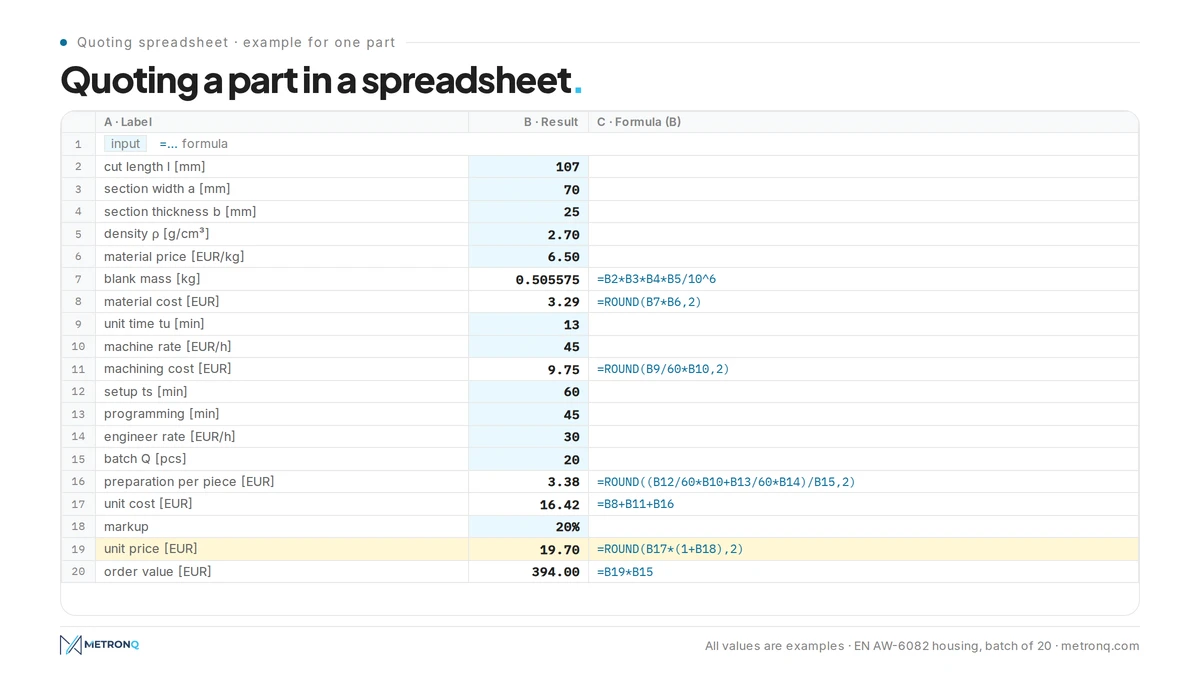
Worked example for one part
Let us recalculate the same part by hand to check the spreadsheet. All values are examples. Blank mass: 107 · 70 · 25 · 2.70 / 10⁶ = 0.505575 kg, so material costs 0.505575 · 6.50 = 3.29 EUR. A unit time of 13 min (milling 9.0 min, drilling and tapping 2.5 min, tool changes and rapid moves 1.5 min) at 45 EUR/h gives 13 / 60 · 45 = 9.75 EUR.
Order preparation: setup 60 min · 45 EUR/h = 45.00 EUR plus programming 45 min · 30 EUR/h = 22.50 EUR, together 67.50 EUR. Per piece at 20 pieces: 67.50 / 20 = 3.375, rounded to 3.38 EUR. Unit cost: 3.29 + 9.75 + 3.38 = 16.42 EUR. With a 20% markup: 16.42 · 1.2 = 19.704, so 19.70 EUR per piece and 394.00 EUR for the order.
The 9.0 min of milling is not a guess. For a Ø10 mm three-flute cutter at = 300 m/min and = 0.06 mm, spindle speed is 1000 · 300 / (π · 10) = 9,549.3, so 9,550 rpm, and feed rate is 0.06 · 3 · 9,550 = 1,719 mm/min. A toolpath of 15,470 mm from the CAM program gives 15,470 / 1,719 = 9.0 min. The cutting parameters calculator does this arithmetic for you, and you type the result into cell B9.
A note on markup: 20% on cost is not the same as a 20% margin on price. In the example the profit is 19.70 - 16.42 = 3.28 EUR, about 16.6% of the price. Name that cell unambiguously so nobody mixes up the two.
How the price depends on batch size
The same spreadsheet, with only cell B15 changed, shows how preparation cost spreads over the pieces. Example values:
| Batch | Preparation per piece [EUR] | Unit cost [EUR] | Unit price [EUR] | Order value [EUR] |
|---|---|---|---|---|
| 1 | 67.50 | 80.54 | 96.65 | 96.65 |
| 5 | 13.50 | 26.54 | 31.85 | 159.25 |
| 20 | 3.38 | 16.42 | 19.70 | 394.00 |
| 100 | 0.68 | 13.72 | 16.46 | 1,646.00 |
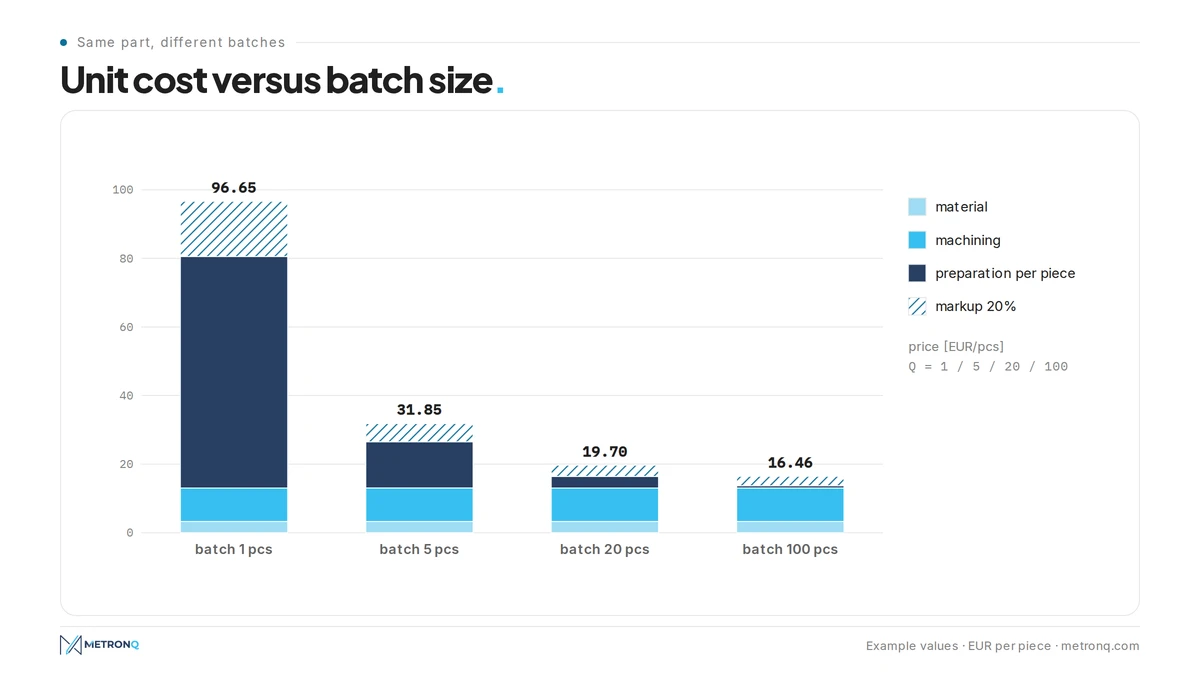
For a single piece, preparation is over 83% of the cost; at a hundred pieces it is just under 5%. That is why a quote without quantity breaks is hard for the customer to read, and a spreadsheet that calculates only one batch hides the most important relationship in quoting. We explain how buyers see these components in the article on machining quotes.
Machine-hour rate: where to get it
The machine rate is the most important number in the spreadsheet, because it multiplies both machining time and setup time. It is calculated from the annual cost of the workstation divided by the hours the machine actually runs and can be invoiced. A rate taken from a competitor or a forum says nothing about your costs.
where:
- - machine-hour rate [EUR/h],
- - annual workstation cost: depreciation, operator, energy, tooling, service, share of building and overhead costs [EUR],
- - effective annual operating time of the machine [h].
In the example the annual workstation cost is 72,000 EUR and the effective time is 1,600 h, so the rate is 72,000 / 1,600 = 45 EUR/h. This is a cost rate with no profit in it, which is why the spreadsheet adds markup separately. The most common mistake is assuming 2,000 h or more: on a single shift a machine rarely cuts that many hours, and every idle hour has to be covered by the hours that are sold.
Every machine in the shop should have its own rate. A five-axis centre and a simple two-axis lathe calculated at the same rate is a reliable recipe for losing bids on simple parts and losing money on difficult ones.
Five places where the spreadsheet fails
The formulas in a spreadsheet are usually correct. The problem is the data that goes into them: every number is read off the drawing, counted or estimated from memory, and the spreadsheet does not check it. Here are the five places where this happens most often, each with an example on the same part.
1. Dimensions retyped by hand
Every blank dimension enters the spreadsheet through the keyboard. Swapping digits in the cut length, typing 170 instead of 107 mm, raises the mass to 0.80325 kg and material cost from 3.29 to 5.22 EUR. The price at 20 pieces rises from 19.70 to 22.02 EUR, or 2.32 EUR per piece, and the customer picks a cheaper offer. The spreadsheet has no way of knowing that the part is 100 mm long.
2. Holes and threads counted on the drawing
The process engineer reads the number of holes, threads and their depths from the views. On a drawing with several views it is easy to miss two M8 threads on a hidden face or overlook a "4×" note on one hole. In the example, missing the threads shortens unit time by 1 min, which is 0.75 EUR of cost per piece and 15.00 EUR on an order the shop will machine anyway.
3. No check whether the part fits the machine
The spreadsheet accepts any number. It will not notice that a 900 mm long part does not fit an 800 mm X travel on the machine whose rate was entered. Nor will it notice that an R3 pocket corner forces a Ø6 cutter instead of Ø10, and the smaller cutter at the same cutting data removes material more slowly, lengthening a milling time that was entered assuming the larger tool.
4. Knowledge in one person's head
Setup time, number of clamping operations and choice of machine are decisions of the process engineer that the spreadsheet simply accepts. When a colleague quotes the same part and enters 30 min of setup instead of 60, preparation per piece drops from 3.38 to 2.25 EUR and the price from 19.70 to 18.35 EUR. Two people, one drawing, two prices 1.35 EUR apart per piece, and neither knows which is right.
5. Costing from part mass instead of the blank
The simplest shortcut is to calculate material from the mass of the finished part reported by the 3D model. In the example the finished part volume is 101,700.9 mm³, which is 0.2746 kg and 1.78 EUR of material, against 3.29 EUR for the piece of flat bar. The difference is 1.51 EUR per piece and 30.20 EUR per order before markup, paid out of your own pocket every time.
How to tell when to move to software
A spreadsheet is enough as long as one person does the quoting, there are a few enquiries a week and the parts are similar. The signal to change is when quotes wait for the process engineer longer than the job waits for the machine, or when the price of the same part depends on who calculated it.
The simplest check relies on your own numbers: take five parts you have already quoted in the spreadsheet, quote them again in the software and compare the results with your figures. We describe it as the five-part test, and you can repeat each step on your own drawings.
This is how the MetronQ CNC quoting software works: it measures the part from a STEP or IGES file (holes with diameter and depth, threads, pockets, thinnest wall) or reads dimensions, tolerances and material from a PDF or DXF drawing. It calculates using your machines, rates and material prices, picks the blank from sizes the stockholder sells, and adds setup once per order. It covers milling up to 5 axes, turning, mill-turn centres and Swiss-type automatics, but not EDM, grinding or sheet metal.
The process engineer sees the price broken down into components and approves it, and a gate decides what goes to the customer immediately. Calibration on at least 5 quotes fits two numbers: the calibration multiplier and setup time. No generative models are used in quoting. When the gate allows a price to be sent without the engineer, the customer gets it straight away, which is what instant CNC quoting means. Current plans are on the pricing page.
Common questions about CNC quoting in a spreadsheet
Can CNC quoting in Excel be accurate?
Yes, if the spreadsheet calculates material from the blank, machining time from real cutting data, preparation once per order and the rate from the machine's own costs. Accuracy then depends on the inputs, not the formulas. The weak points remain reading dimensions, holes and threads off the drawing by hand, and knowledge held by one engineer.
How do you spread machine setup cost over a batch in a spreadsheet?
Setup and programming cost is calculated once per order and then divided by the number of pieces in the batch. In the example, 67.50 EUR of preparation is 67.50 EUR per piece for a single part and 0.68 EUR per piece at a hundred. Show the customer several quantity breaks, because the unit price changes several times over.
Why should material be calculated from the blank and not from part mass?
Because the stockholder sells bar in standard sizes, and the chips are paid for too. In the example, a 70 × 25 × 107 mm piece of flat bar costs 3.29 EUR, while material calculated from the finished part mass is only 1.78 EUR. The 1.51 EUR difference per piece disappears from profit on every order quoted from mass.
What machine-hour rate should go into the spreadsheet?
Your own, calculated from the annual workstation cost divided by the effective operating time. In the example, 72,000 EUR of cost and 1,600 h gives a cost rate of 45 EUR/h, with markup added separately. Every machine should have its own rate, because a five-axis centre and a simple lathe have completely different costs.
When does a spreadsheet stop being enough for quoting?
When enquiries arrive faster than one person can price them, when the price of the same part depends on who quoted it, or when mistyped dimensions and missed threads start costing real money. At that point it is worth comparing the spreadsheet with software on five parts that have already been quoted.
Sources
- 1.G. Boothroyd, W. A. Knight, "Fundamentals of Machining and Machine Tools", CRC Press (economics of machining, cost per component)
- 2.Sandvik Coromant, "Metal cutting technical guide" (cutting speed, spindle speed and feed rate formulas)
Read next
Automatic CNC machining quotes
Priced from the 3D model or the drawing, on your machines and your rates. You just approve it. 14 days free, no card.
Create a free account