Machining Process Sheet: Contents and Template

A process sheet (also called a routing sheet or route card) is the document that describes how a part is machined, operation by operation: the operation number and name, the work centre, the fixtures and tooling, and the setup and unit times. The shop floor makes the part from it, and the estimating department calculates its cost from it.
A well-prepared process sheet is the shortest path from a drawing to a finished part. This guide explains what a process sheet is and how it differs from the other manufacturing documents, what it should contain, how to fill it in and how it turns into a part price. At the end you will find a free template in XLSX and PDF and a filled-in example for a stepped shaft.
What a process sheet is
A process sheet is the basic manufacturing document in a machine shop. It lists the operations in the order they are performed, together with the work centre for each one, the special fixtures and tooling it needs, and the time standards. One process sheet covers one part (or one assembly) and one drawing revision, and it serves three departments at once: production, planning and cost estimating.
A process sheet focuses on WHAT has to be done and WHERE, not on HOW each tool movement is made. It lets the planner load jobs onto machines, purchasing order the stock and tools, and the estimator calculate the labour content, and finally it is used to close the job. That is why a good process sheet is short, unambiguous and always matches the current drawing revision. It also makes it possible to compare two machining routes for the same part before production starts.
Process sheet, routing and part process plan
In practice "process sheet", "routing sheet", "route card" and "operation list" usually mean the same document; ERP systems tend to call it a routing. For a simple part it covers a single component; for a complex product there is a set of sheets for the parts and a separate assembly sheet. The process sheet is the formal record of how the product is made, and it is the reference every department works from when the design changes.
The machining process behind the sheet
Every sheet records one process. The machining process of a part is divided into operations, setups and cuts, and the sheet shows it at the level of operations. The detailed process, broken down into individual cuts and passes, is designed first; the sheet is its compact summary. The stages of machining, from roughing to finishing, and where they sit in the process are covered in our guide to machining basics. Here we focus on the document itself.
Manufacturing documentation: the process sheet and the other documents
Manufacturing documentation is the set of documents that define how a product is made, from the raw stock, through every operation, to inspection. It complements the design documentation: the drawing says what the part must be, and the process sheet says how to make it. Which documents a shop uses depends mostly on the batch sizes it runs.
| Document | What it contains | When it is used |
|---|---|---|
| Process sheet (routing) | the whole process: operations, work centres, tooling, setup and unit times | always, at any production volume |
| Operation sheet | details of one operation: cuts, tools, cutting data, a clamping sketch | batch and mass production, complex operations |
| Inspection sheet | what to measure, with what, how often and who signs off | parts with quality requirements, customer acceptance |
| Material specification | grade, size and weight of the stock, consumption standards | purchasing and material costing |
| Time study sheet | breakdown of the time standards into components | work measurement and labour costing |
| Detail drawing | dimensions, tolerances, surface finish, revision | always, as the basis for all sheets |
| NC program | the code that drives the CNC machine | operations on CNC machines |
Each document has its own number, revision and owner. The operation sheet expands one line of the process sheet, the inspection sheet describes acceptance, and the time study sheet explains where the numbers in the setup and unit time columns come from. For assembled products there is also an assembly sheet with the joining sequence.
Design documentation versus manufacturing documentation
The two are often confused. Design documentation is created in engineering: drawings, bills of materials, requirements. Manufacturing documentation is created from it by process engineering and answers the question of how this product is made in a particular shop. The same drawing can therefore have two different routings in two factories, because each one reflects the machines the shop actually has.
Types of process sheets
The type of sheet depends on volume. In one-off and small-batch production, shops use a simplified sheet with slightly longer operation descriptions, sometimes with a sketch, and it replaces separate operation sheets. In batch and mass production the process sheet lists only the sequence of operations, and each complex operation gets its own operation sheet. Assembly has its own sheet in which assembly stations take the place of machines, with the joining sequence, tightening torques, component consumption and inspection after each stage.
Why manufacturing documentation matters for product quality
The value of good documentation is clearest when a job repeats. If the knowledge of how to make a part lives only in an operator's head, every change of staff is a risk of a different result. Up-to-date, complete and readable documentation translates directly into product quality and decides whether inspection finds deviations on the first piece or the customer finds them later. ISO 9001 requires production under controlled conditions, including documented information on the activities to be performed, and the process sheet is the simplest form of that information.
What a process sheet contains
Form layouts vary from shop to shop, but the set of fields is almost always the same. A process sheet should contain:
- header: part name and number, drawing number with revision, sheet number and revision;
- material and stock: grade (e.g. C45 / 1.0503), form and size (bar Ø45 × 185 mm), weight;
- batch size (), because the setup time per piece depends on it;
- operation number: usually 10, 20, 30..., so that a new operation can be inserted without renumbering the whole sheet;
- operation name and a short description of its scope;
- work centre or machine and department;
- fixtures and tooling: chucks, fixtures, special tools, gauges;
- times: setup time per batch and unit time per piece ;
- notes: subcontracting, heat treatment, inspection requirements;
- sign-off: prepared by, checked and approved by, date.
This information serves production (what and where), planning (how much and when) and estimating (at what cost) at the same time. That is why every sheet in a shop should use the same fields and the data should be searchable.
Time standards on the sheet: setup and unit time
The times on the sheet come from work measurement. The unit time applies to every piece and consists of machining time, handling time and allowances:
where:
- - machining time, while the tool is removing material [min],
- - handling time: loading, measuring, rapid moves [min],
- - allowances for workplace servicing and personal needs [min].
The standard time for the whole batch is the setup time plus the unit time of every piece:
where:
- - setup time per batch [min],
- - number of pieces in the batch,
- - unit time [min].
Machining time for turning or milling follows from the tool path, feed and spindle speed; the quickest way to check speed and feed for a given material is our cutting parameters calculator.
Operations on the sheet and operation instructions
The basic unit of a process sheet is the operation: everything that happens at one work centre. Each cut within an operation is described in detail only on the operation sheet, while the process sheet gives each operation one line with its time and work centre. When an operation needs details the operator cannot be expected to know, an instruction is attached: a clamping sketch, tools and cutting data. In batch work a large part of each operation is handling rather than cutting, which is exactly what the unit time captures.
Process sheet template: free download
We have prepared the template in two formats, with no e-mail sign-up:
- process sheet template - XLSX: a process sheet with a full header (product, part, drawing and revision, material with standard, stock, weight, batch size), an operations table with separate columns for fixtures, cutting tools and gauges, the operation sheet or NC program number, labour grade and inspection points, automatic setup and run-time totals, batch time and cost per piece, a sign-off block and a revision record; the file also contains an operation sheet with a sketch area and machining-time calculation, the filled-in shaft example and filling instructions;
- process sheet template - PDF: the same sheets ready to print on A4 and fill in by hand at the machine.
The template has the fields listed above and room for sign-off. If your shop has its own layout, use it as a starting point: you can add columns, but do not remove setup and unit time, because they are what links the sheet to cost.
Process sheet example: a stepped shaft
This is what a filled-in process sheet looks like for a stepped shaft in C45 steel. The stock is Ø45 mm bar, the batch is pieces, and the bearing journals are toleranced h6 with a surface finish of µm, so the process includes grinding.
| No. | Operation | Work centre | Fixtures and tooling | [min] | [min] |
|---|---|---|---|---|---|
| 10 | Saw bar Ø45 to length 185 mm | band saw | vice, length stop | 10 | 2.5 |
| 20 | Turning, setup I: face, centre drill, rough side A | CNC lathe | 3-jaw chuck, roughing tools, centre drill | 45 | 4.0 |
| 30 | Turning, setup II: face to 180 mm, centre drill, rough side B | CNC lathe | soft jaws | 20 | 3.5 |
| 40 | Quench and temper | subcontractor | - | - | - |
| 50 | Finish turning with grinding allowance, chamfers, undercuts | CNC lathe | live centre, face driver | 30 | 3.0 |
| 60 | Mill keyway | machining centre | V-blocks, end mill | 30 | 2.0 |
| 70 | Grind journals to h6 | cylindrical grinder | centres, grinding wheel | 40 | 4.0 |
| 80 | Deburr and inspect | inspection | micrometer, runout gauge, profilometer | 10 | 3.0 |
| Total | 185 | 22.0 |
The sheet already tells you almost everything: the part passes through five work centres and one subcontractor, the lathe setups take 95 minutes per batch, and one piece takes 22 minutes. The full process plan for this shaft, with work steps and cutting data, is in our article on the machining process plan. It is also a ready-made list for the planner: operation 40 means a gap for subcontracting that has to go into the schedule. How the steps of a shaft like this are turned, and what decides the finish on the journals, is shown in our guide to longitudinal turning.
How to create a process sheet step by step
A process sheet starts not with the form but with the drawing. The steps follow the logic of process planning and appear in the same order in every textbook on the subject.
- Review the drawing: material, dimensions, tolerances, surface finish, heat treatment, revision. This is where you decide which features are critical and what they cost; tight tolerances can double the time, as we explain in our article on how tolerances drive CNC machining cost.
- Choose the stock: bar, forging, casting or plate, with a machining allowance.
- Choose the datums: where you measure from and where you clamp. Poor datums are the most common cause of scrap in later setups.
- Set the sequence of operations: roughing first, then semi-finishing, then finishing; heat treatment before the operations that must remove its distortion. The sequence also determines the number of setups, and every setup is a separate setup time.
- Select machines and tooling: machines, workholding, tools that are available in the shop or at a subcontractor.
- Set the time standards: setup and unit time for every operation, from calculation, standard data tables or measurement on a similar part.
- Approve: a second person checks, signs and assigns a number and revision.
For a simple part an experienced process engineer needs well under an hour; a part with many setups and subcontracted steps can take several hours.
Filling in the sheet in practice
A few rules that work well in machine shops:
- one operation means one work centre; a change of machine means a new operation number;
- record every setup on the same machine separately, or at least give it its own setup time;
- start the operation name with the process verb (turn, mill, grind), not the machine name;
- subcontracting and heat treatment get their own numbers, even without times;
- enter times in minutes with one decimal place so that the totals add up.
Start with the operation column, then add work centres, and fill in the times last, once the sequence is fixed. A process sheet should fit on one page; if it does not, some of the descriptions belong on operation sheets.
From process sheet to part price
The setup and unit time columns are the basis of cost. With a machine hour rate, the machining cost of one piece is:
where:
- - machining cost per piece,
- - total unit time of all operations [min],
- - total setup time [min],
- - machine hour rate converted to a rate per minute,
- - number of pieces in the batch.
For the shaft above, at a simplified shared rate of 180 per hour (3 per minute), a batch of 50 gives per piece, while a batch of 5 gives about 177. The whole difference is setup time spread over fewer pieces. Every extra setup adds another setup time, and material and subcontracting still have to be added on top. The machine hour rate itself has to include depreciation, interest, floor space, energy and maintenance, not just the operator's wage.
A process sheet tells you how long a part takes. MetronQ tells you what it costs - from the 3D model, with setup for every clamping and with material. The process engineer sees the breakdown and approves the quote. The shop gets this cost breakdown before anyone writes the process sheet, with price and time per operation shown in the shop panel; plans are listed on the pricing page.
Using process sheets on the shop floor
A process sheet does not stop being useful once it is printed. It lets the planner build the job queue, the stores issue the stock, the tool room prepare tooling and inspection prepare gauges. That only works if the sheets are kept up to date: as soon as the operator knows better than the sheet, the sheet stops mattering.
The sheet also comes back to the process engineer. Actual times from production show where the standards were too optimistic, and a revised sheet gives a better quote the next time the part is ordered. Used consistently, process sheets close the loop between process engineering, production and estimating, and they make it possible to compare planned and actual cost. A simple test of documentation quality: could a new operator make the part from the sheet alone?
Managing process sheets: paper or software
Keeping process sheets is ongoing work: drawings change, machines are replaced and time standards are corrected. Managing them means numbering, revision control, an approval workflow and retaining the documentation for as long as the product is made and serviced.
Paper still dominates in many small shops. It has advantages: it is always at the machine and needs no system. It also has a drawback that grows over time: paper copies drift away from the drawing, because the new revision reaches the office while the old one stays on the shop floor. Electronic documentation solves this with a single source of truth, and visual documentation (photos of the clamping, screenshots from simulation) replaces descriptions nobody reads.
Production management software: CAPP, ERP and MES
Software for process sheets falls into three groups. CAPP (computer-aided process planning) systems support the process design itself. ERP systems store the routing as part of the item master and use it to calculate capacity requirements and cost. MES systems show the operator the current sheet at the work centre and collect actual operation times, which are then used to correct the standards. In such a system, process data (sheets, NC programs, drawings) and production data (orders, progress, downtime) are kept together.
Does a small shop need an MES? Not always. Visualisation and automation start to pay off when there are many jobs running over several shifts and work centres. With a handful of machines, a good spreadsheet with revision control is enough. What matters is a single source of process sheets, not a particular software brand.

Common mistakes in process sheets
The same mistakes appear regardless of industry and format:
- no setup time for each clamping: flipping the part to the other side is a new setup, new datums and a new setup time; a sheet with one setup time for the whole lathe understates the cost of small batches;
- no stock allowance: bar cut to the finished length leaves nothing to face, and a forging without allowance will not clean up;
- out-of-date drawing revision: a sheet written for an old revision produces scrap that nobody notices until inspection;
- vague operation names: "machining" instead of "finish turn journals" tells neither the operator nor the planner what should happen;
- no inspection operation: inspection takes time and a work centre too, so it should have its own number.
Each of these mistakes costs twice: once in production and once in the quote, because the sheet feeds both.
Frequently asked questions about process sheets
What is a process sheet in manufacturing, and how does it differ from the machining process?
It is a document listing how a part is made: the operations in sequence, the work centres, fixtures and tooling, and the setup and unit times. The machining process is the making of the part itself, and the sheet is its compact record, so one process can have several sheet versions, for example for different machines.
How does a process sheet differ from an operation sheet?
The process sheet covers the whole process at the level of operations, giving each operation one line with its time and work centre. The operation sheet breaks one operation down into cuts, with tools, cutting data and a clamping sketch. It is used in batch and mass production and for complex operations.
Who prepares the process sheet?
A process (manufacturing) engineer, because it requires knowledge of the shop's machines and tooling; it is approved by the head of process engineering and checked by quality before series production starts. For a simple part an experienced process engineer needs well under an hour; a part with many setups and subcontracted steps can take several hours.
How do you create a process sheet from scratch, and what is most often forgotten?
You start by reviewing the drawing and choosing the stock, then set the datums, the sequence of operations, the machines and the times, and finally a second person checks and signs the sheet. The most common omission is a separate setup time for every clamping: flipping the part to the other side is a new setup.
What should a process sheet contain, and how do you fill it in for a new part?
Part and drawing number, material and stock, batch size, operation numbers and names, work centres, tooling, setup time, unit time and sign-off. The XLSX template above adds up the times automatically. Start with the operation column, then add work centres, and fill in the times last, once the sequence is fixed.
Is a process sheet mandatory, and what does basic manufacturing documentation include?
No law requires it as such, but customers and quality systems do, for example ISO 9001 in its requirements for controlled production. Basic manufacturing documentation consists of the process sheet, operation sheets, the inspection sheet and the material and time study sheets. The detail drawing is the basis for all of them, and CNC operations add an NC program.
Paper or software: what works better for managing process sheets?
With a few machines, a spreadsheet with revision control is enough. With many jobs and frequent drawing changes, a system with one current revision is safer than paper, because paper copies drift away from the drawing: the new revision reaches the office while the old one stays on the shop floor. A single source matters more than the software brand.
How does manufacturing documentation affect product quality?
Directly: the same part made from the same sheet gives a repeatable result regardless of operator or shift. If the knowledge of how to make a part lives only in an operator's head, every change of staff risks a different result. Up-to-date, complete and readable documentation also decides whether inspection finds deviations on the first piece or the customer does.
Downloads
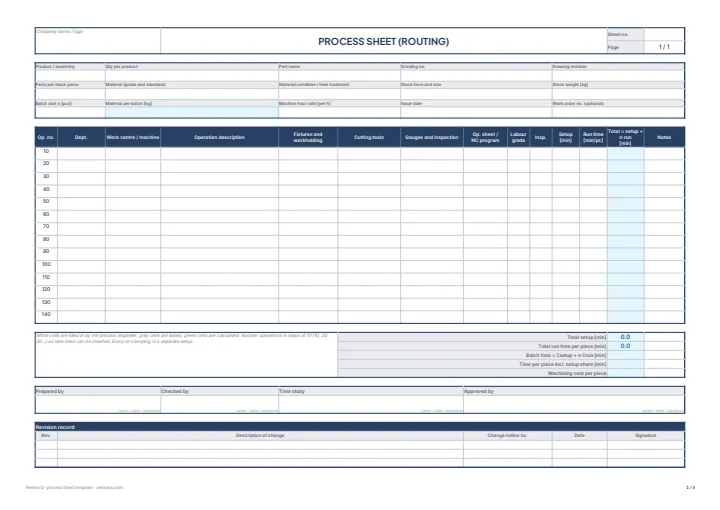
Process sheet and operation sheet - template
Blank process sheet (routing) and operation sheet, filled-in examples for a stepped shaft and filling instructions. A4 landscape. The XLSX totals setup times, unit times and cost per piece automatically; the PDF is ready to print.
Sources
- 1.M. Feld, "Podstawy projektowania procesów technologicznych typowych części maszyn", WNT, 2018 (manufacturing documentation, process and operation sheets, shaft processes)
- 2.R. Wołk, "Normowanie czasu pracy na obrabiarkach", WNT, 1972 (setup and unit time standards)
- 3.M. Lembersky (ed.), "Realistic Cost Estimating for Manufacturing", 3rd ed., SME, 2016 (setup time per piece, machining cost estimating)
- 4.ISO 9001:2015, clause 8.5.1 (control of production)
Read next
Automatic CNC machining quotes
Priced from the 3D model or the drawing, on your machines and your rates. You just approve it. 14 days free, no card.
Create a free account